Online shops and booking websites need to feel effortless for customers, but behind every simple checkout, appointment form or reservation calendar there should be a careful security strategy. For UK business owners, online store security is not only a technical concern. It protects revenue, customer trust, brand reputation, search visibility and the long-term value of your website.
Whether you sell products through an e-commerce platform, take deposits for appointments, manage table bookings or offer paid events, your website handles sensitive data. That may include customer names, email addresses, phone numbers, delivery addresses, payment details, account passwords and booking preferences. A well-designed website should make this journey clear and convenient while reducing the risk of fraud, data loss and avoidable disruption.
Why online store security is a business priority
Security is often discussed in technical language, but its commercial value is straightforward. A secure website helps customers feel confident enough to buy, enquire or book. It reduces abandoned baskets, supports repeat purchases and gives your marketing campaigns a stronger foundation.
If your website is compromised, the impact can spread quickly. A hacked checkout page can damage customer confidence. A booking form that sends spam can affect email deliverability. Malware warnings in browsers can stop visitors before they ever see your offer. Search engines may also display warnings or reduce visibility for pages that appear unsafe.
For small and growing UK businesses, the reputational effect can be just as serious as the technical one. Customers expect online stores and booking websites to be professional, reliable and secure. They may not understand the details of SSL certificates, payment gateways or software updates, but they will notice browser warnings, broken forms, suspicious redirects and poorly designed checkout pages.
Good security also supports compliance. UK businesses handling personal data must consider the UK GDPR and the Data Protection Act 2018. If you accept card payments, your setup should align with the Payment Card Industry Data Security Standard, commonly known as PCI DSS. In many cases, using a reputable payment gateway reduces how much card data your own website stores, but it does not remove your responsibility to operate the website carefully.
Start with a secure website foundation
The strongest security work starts before a website goes live. Choices made during website design, hosting, platform selection and domain setup all affect the level of risk. A visually attractive website that relies on outdated software or poorly configured hosting can still be vulnerable.
Choose the right platform for your store or booking journey
Popular e-commerce and content management platforms can be a sensible choice because they are actively maintained, widely supported and compatible with established payment systems. For example, many UK businesses use platforms such as WooCommerce, Shopify, Magento or specialist booking software, depending on the complexity of their requirements.
The right platform depends on your products, stock management, booking rules, payment methods, integrations and marketing plans. A small appointment-based business may need a simple calendar system with automated confirmation emails. A retailer with hundreds of products may need stock control, product filtering, abandoned basket recovery and integration with accounting or fulfilment tools.
Security should be part of that decision. Look at how updates are managed, whether extensions are well maintained, how user permissions work and how easily the platform connects to trusted payment providers. Avoid adding unnecessary plugins, apps or scripts simply because they offer one attractive feature. Each additional component can increase maintenance and risk.
Use HTTPS across the whole website
Every online store and booking website should use HTTPS, not just the payment page. HTTPS encrypts data between the visitor’s browser and the website, helps prevent tampering and displays the padlock in modern browsers. It is also a standard expectation for search engines and customers.
An SSL certificate should be correctly installed, renewed on time and applied site-wide. Mixed content, where a secure page loads insecure images, scripts or styles, can create browser warnings and undermine trust. During a website launch or redesign, HTTPS should be tested across product pages, forms, checkout pages, account areas and booking confirmation screens.
Keep software updated
Many website compromises happen because old software remains online for too long. Content management systems, e-commerce extensions, booking plugins, themes and server software all need regular updates. Updates often include security patches, not just new features.
Before applying updates to a live store, it is sensible to test them where possible, especially if your website has custom functionality. A broken checkout or unavailable booking calendar can cost sales, so maintenance should be planned rather than ignored. The important point is to treat updates as an ongoing part of running the website, not as an occasional emergency task.
Protect checkout, payment and booking forms
The checkout or booking stage is where customers make their highest-trust decision. Design and security must work together. If the process feels confusing, slow or suspicious, users may leave. If it is technically weak, your business may be exposed to fraud, spam or data issues.
Use trusted payment gateways
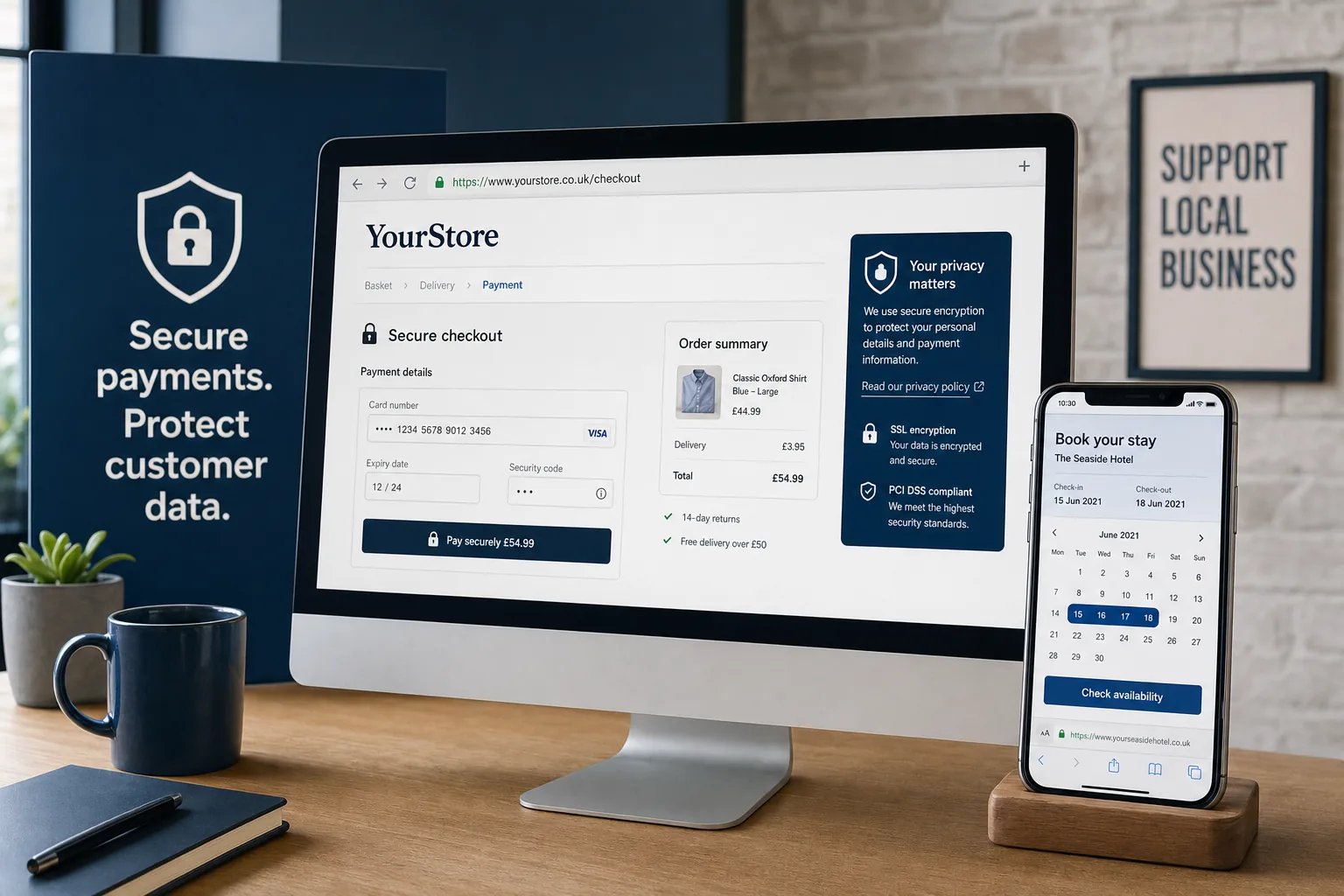
For most UK businesses, the safest approach is to use a recognised payment gateway so card details are processed securely without being stored directly on the website. Hosted payment pages, embedded secure payment fields and tokenisation can reduce risk while still offering a smooth customer experience.
Payment security is also affected by Strong Customer Authentication, which is being introduced across online card payments. Businesses should be prepared for additional authentication steps, such as bank app approvals or one-time passcodes, while ensuring the checkout journey remains clear. Good instructions and consistent branding can help reduce confusion during payment.
Reduce unnecessary data collection
Only ask for the information you genuinely need. A retailer may need a delivery address, but a downloadable product may not. A booking website may need a phone number for appointment changes, but it may not need a date of birth unless there is a clear reason.
Collecting less data reduces risk and can improve conversion rates. Long forms create friction, particularly on mobile devices. A good website design process will review every form field and ask whether it is useful, required and proportionate.
Defend forms against spam and abuse
Contact forms, registration forms, review forms and booking forms can be targeted by bots. Spam submissions waste time, affect email systems and may lead to malicious links being sent through your website.
Practical protections include honeypot fields, rate limiting, email verification, sensible CAPTCHA use and moderation for customer reviews. The aim is to reduce abuse without making genuine customers struggle. A booking form that is too difficult to complete can create the same commercial problem as a form that is not protected at all.
Manage passwords, permissions and admin access
Weak administration access remains one of the most common security problems for online stores. A polished public website can still be at risk if staff accounts use simple passwords or if old user accounts remain active after people leave the business.
Use strong, unique passwords for website administration, hosting, email, analytics, payment accounts and social media profiles. Password managers can help teams use better passwords without relying on memory or shared spreadsheets. Where available, two-factor authentication should be enabled for administrative accounts.
Permissions should follow the principle of least privilege. Not every staff member needs full administrator access. A content editor may only need to update product descriptions or blog posts. A warehouse user may only need access to orders. Limiting access reduces the chance that a compromised account can cause widespread damage.
Review user accounts regularly. Remove unused accounts, especially for former staff, previous developers or old agencies. If external partners need access, provide named accounts rather than shared logins, and remove access when the work is complete.
Backups, monitoring and recovery planning
No security approach can guarantee that nothing will ever go wrong. That is why backups and recovery planning are essential. A useful backup is one that is regular, complete, securely stored and tested. It should cover website files, databases, product information, customer data where appropriate, and configuration settings.
Backups should not sit only on the same server as the website. If the server fails or is compromised, local backups may be affected too. Keeping separate copies provides a better recovery option. The frequency of backups should reflect how often your website changes. A busy online store may need more frequent backups than a brochure website.
Monitoring is also valuable. Alerts for downtime, suspicious logins, malware, expired SSL certificates or failed payments can help you respond before a small issue becomes a larger one. For booking websites, monitoring should include key user journeys, such as selecting a date, completing a form and receiving confirmation.
Security and website design should work together
Security is not separate from user experience. A trustworthy website is designed to reassure visitors at every stage. Clear navigation, consistent branding, well-written content and transparent policies all contribute to confidence.
Product pages should show accurate descriptions, delivery information, returns guidance and customer support details. Booking pages should explain availability, cancellation terms, deposits and confirmation processes. Checkout pages should look consistent with the rest of the site so customers do not feel they have been sent somewhere unexpected.
Trust signals should be genuine and relevant. These may include secure payment messaging, clear contact details, company information, delivery options, privacy information and customer service routes. Avoid cluttering pages with excessive badges or vague claims. A clean, well-structured layout often feels more credible than a page overloaded with graphics.
Mobile design deserves particular attention. Many customers discover products through social media or search on their phone, then complete a purchase or booking immediately. Forms should be easy to tap, payment buttons should be clear and error messages should explain what needs to be corrected. Security features must not make the mobile experience awkward.
Domain registration and brand protection
Your domain name is a central part of your online identity. It appears in search results, email addresses, social media profiles, adverts and printed materials. Good domain management helps protect both your brand and your customers.
Choose a domain that is clear, memorable and closely connected to your business name or service. For UK businesses, a relevant UK domain can help users recognise your local presence, while other suitable extensions may be useful for brand protection or future campaigns.
Keep domain ownership details accurate and ensure renewal reminders go to an actively monitored inbox. Losing control of a domain can interrupt your website, email and marketing activity. Domain access should be protected with a strong password and two-factor authentication where available.
It is also sensible to register obvious variations where there is a clear business case, such as common spelling alternatives or relevant extensions. This can reduce the risk of customer confusion. Avoid making domain decisions based only on short-term marketing ideas; your domain should support long-term brand consistency.
SEO, social media and digital marketing benefits
Online store security has a direct relationship with digital marketing performance. Search engine optimisation relies on a website being crawlable, fast, stable and trustworthy. If pages are compromised, redirected or blocked by browser warnings, organic visibility can suffer.
HTTPS is already a basic expectation for SEO. Secure, well-maintained pages also support better user behaviour signals, such as lower bounce rates and stronger engagement. A clear checkout journey can improve conversion rates from organic search, paid search, email marketing and social campaigns.
Social media marketing also depends on trust. If someone clicks from Facebook, Instagram, LinkedIn or Pinterest and lands on a slow, insecure or confusing page, the campaign is unlikely to perform well. Landing pages for offers, product launches or seasonal bookings should be tested before campaigns go live. Forms, payment links, tracking tags and confirmation emails should all work correctly.
Security should also extend to your marketing accounts. Social media profiles, advertising accounts, email marketing platforms and analytics tools can all be valuable targets. Use strong passwords, two-factor authentication and careful permission management. If an agency or freelancer supports your marketing, give access through proper user roles rather than sharing your main login.
Security checklist for online stores
Security is easier to manage when it becomes part of routine website care. The following checklist is a useful starting point for UK business owners reviewing an online shop or booking website.
- Use HTTPS across the entire website and resolve mixed content warnings.
- Keep the website platform, theme, plugins, apps and booking tools updated.
- Use a trusted payment gateway rather than storing card details directly.
- Enable two-factor authentication for admin, hosting, payment and marketing accounts where available.
- Use strong, unique passwords and remove unused user accounts.
- Limit staff permissions to the access each person actually needs.
- Back up website files and databases regularly, with copies stored separately.
- Test checkout, booking forms and confirmation emails on desktop and mobile.
- Protect forms against spam while keeping them easy for genuine customers.
- Collect only the customer data needed for the transaction or booking.
- Keep privacy, returns, delivery, cancellation and contact information clear and accessible.
- Monitor uptime, SSL certificate status and suspicious website activity.
- Secure domain, email, social media and advertising accounts.
Building trust through secure digital growth
Online store security should not be treated as a one-off technical task. It is part of professional website design, reliable e-commerce management and effective digital marketing. The safest websites are planned, maintained and reviewed as the business grows.
For a new online store, that means choosing the right platform, designing a trustworthy checkout and setting up secure payment processing from the beginning. For an established website, it may mean reviewing old plugins, improving mobile forms, strengthening admin access and checking whether the user journey still meets customer expectations.
Customers want to buy, book and enquire with confidence. Search engines want to send users to websites that are safe and useful. Marketing campaigns work harder when landing pages load properly, forms behave as expected and visitors trust the brand behind the page.
By making online store security part of your wider digital strategy, you protect more than data. You protect customer relationships, campaign performance, search visibility and the reputation your business has worked hard to build.
Frequently asked questions
Why is online store security a business priority?
Security is often discussed in technical language, but its commercial value is straightforward. A secure website helps customers feel confident enough to buy, enquire or book. It reduces abandoned baskets, supports repeat purchases and gives your marketing campaigns a stronger foundation. If your website is compromised, the impact can spread quickly. A hacked checkout page can damage customer confidence. A booking form that sends spam can affect email deliverability. Malware warnings in browsers can stop visitors before they ever see your offer. Search engines may also display warnings or reduce visibility for pages that appear unsafe. For small and growing UK businesses, the reputational effect can be just as serious as the technical one. Customers expect online stores and booking websites to be professional, reliable and secure.