A content hub is one of the most effective ways for a business website to move beyond occasional blogging and start building genuine authority around a subject. Rather than publishing unrelated articles whenever time allows, a content hub gives your advice, guides, videos, downloads and service pages a clear structure. For UK business owners investing in website design, SEO or digital strategy, this approach can make your expertise easier for customers and search engines to understand.
The idea is simple: choose an important topic your audience cares about, create a central page for it, then support that page with useful related content. Over time, the hub becomes a trusted destination for that subject. It can help visitors answer questions, compare options and feel more confident about contacting your business.
What is a content hub
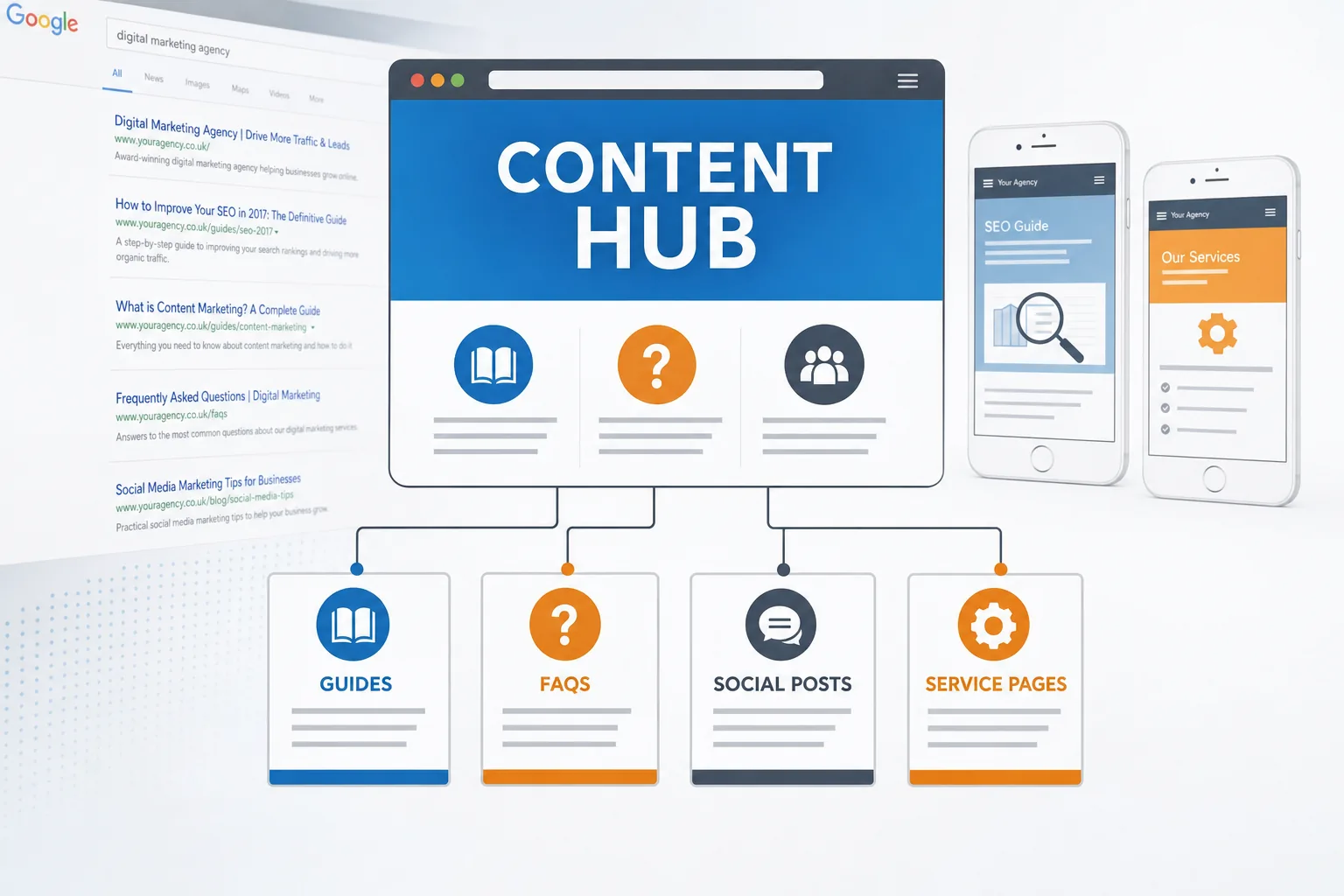
A content hub is a central section of your website dedicated to a particular topic, product area, service category or customer problem. It usually contains a main hub page, which introduces the subject and links to supporting resources. Those supporting resources might include blog posts, how-to guides, case studies, FAQs, comparison articles, infographics, videos, downloadable checklists or relevant service pages.
For example, a building firm might create a content hub around house extensions. The main page could explain the extension process, planning considerations and common project types. Supporting articles could cover permitted development, kitchen extensions, loft conversions, choosing materials, preparing a budget and what to ask before appointing a contractor. Each piece serves a specific search intent, while the hub page brings everything together.
This is different from a standard blog archive. A blog archive lists posts by date, which is useful for browsing recent updates but not always helpful for someone researching a subject in depth. A content hub is organised around user needs. It helps visitors move naturally from broad information to more detailed answers and, when appropriate, towards an enquiry.
Why topical authority matters for businesses
Search engines are increasingly good at recognising whether a website covers a topic in a helpful and comprehensive way. A single page optimised for a keyword can still perform well, but it is often stronger when supported by a wider body of relevant content. This is where topical authority becomes valuable.
Topical authority means your website demonstrates depth, clarity and usefulness around a subject. If your business sells commercial flooring, for instance, it is not enough to have one page saying you offer flooring services. You could also provide guidance on vinyl flooring, safety flooring, office refurbishment, maintenance, slip resistance, installation timescales and choosing materials for different sectors. Together, those pages show a level of expertise that one short sales page cannot.
For business owners, the benefits are practical. A well-planned content hub can attract visitors at different stages of the buying journey. Some people are just starting to research. Others are comparing providers. Others need reassurance before making an enquiry. By answering their questions clearly, you reduce friction and build trust before a sales conversation begins.
Content hubs can also make your website more efficient. Instead of writing isolated articles that disappear into an archive, every new resource strengthens the main topic area. Your internal links become more purposeful, your navigation becomes clearer and your marketing team has a more coherent set of assets to share.
How website design supports a successful content hub
A content hub is not only an SEO exercise. It is also a design and user experience project. If the hub is difficult to navigate, visitors may leave before they find the information they need. The design should make the topic feel organised, accessible and useful.
The main hub page should give visitors a clear overview. It can introduce the topic, explain who the content is for and group supporting resources into sensible categories. Use clear headings, short paragraphs and descriptive links. Avoid forcing readers through long blocks of text before they can find the next step.
Good hub design often includes:
- A strong introduction: Explain the topic and why it matters to the reader.
- Grouped content sections: Organise resources by question, service type, audience, level of knowledge or stage of decision-making.
- Clear calls to action: Offer routes to make an enquiry, request advice, download a guide or explore a service page.
- Consistent page layouts: Keep supporting articles easy to read with predictable headings, imagery and navigation.
- Prominent internal links: Help visitors move between related guides without relying on the main menu.
Responsive design is important. Many visitors will discover your content through search or social media on a mobile device. Pages should load quickly, text should be readable without zooming, buttons should be easy to tap and forms should be straightforward to complete. A content hub that works well on desktop but feels awkward on mobile will miss opportunities.
Planning a content hub around customer questions
The strongest content hubs begin with customer understanding rather than a list of keywords alone. Search data is useful, but your sales conversations, support emails and face-to-face meetings can reveal the questions people ask before they buy. Those questions often make excellent article topics.
Start by choosing a topic that is commercially important and broad enough to support multiple pieces of content. It should be something your business genuinely wants to be known for. Then map out the questions customers ask at different stages.
Awareness stage
At this stage, people may not know the solution yet. They are trying to understand a problem or opportunity. Useful content might include introductory guides, definitions, common mistakes and checklists. For example, an accountancy firm could create articles explaining when a small business should register for VAT, how bookkeeping records should be kept and which expenses may need attention.
Consideration stage
Here, readers are comparing options. They may want practical guidance, pros and cons, process explanations or sector-specific advice. A website design agency might publish content about choosing between a brochure website and an e-commerce website, planning a redesign or preparing content before a project starts.
Decision stage
At this point, visitors need confidence. Useful pages may include service explanations, FAQs, case studies, testimonials, process pages and contact routes. The content should be honest and specific, helping a potential customer understand what will happen next if they get in touch.
When planning titles, avoid writing only for broad, competitive keywords. Long-tail searches often reveal strong intent. A phrase such as how to choose a domain name for a local business may attract fewer searches than domain name, but the visitor may be far more relevant.
Using internal links to strengthen the hub
Internal linking is one of the most important parts of a content hub. It helps visitors discover related information and gives search engines a clearer view of how your pages are connected. The main hub page should link to all important supporting resources, and those supporting resources should link back to the hub where relevant.
Use descriptive anchor text. Instead of linking the words click here, link a phrase that explains the destination, such as guide to choosing a business domain name or website redesign checklist. This is more useful for readers and more meaningful for search engines.
It is also worth linking between supporting articles. If a guide about social media planning mentions landing pages, link to your relevant page about campaign landing page design. These connections help people continue their research and keep the hub feeling complete.
A content hub works best when it feels like a guided resource, not a pile of separate articles.
Supporting a content hub with social media marketing
Publishing the hub is only part of the job. Social media can help introduce your resources to existing followers, professional networks and potential customers who are not yet searching for your services. In 2017, platforms such as Facebook, Twitter, LinkedIn, Instagram and Pinterest can all play a role, depending on your audience and sector.
Rather than sharing the same link once and moving on, break the hub into smaller social media themes. One article might provide several posts: a practical tip, a question, a statistic, a short quote and a link to the full guide. Visual posts can highlight diagrams, checklists or key points. For business-to-business services, LinkedIn updates can work well when they focus on practical advice rather than overt selling.
Social media is also useful for listening. Comments, shares and questions can show which topics people find valuable. If a post about a particular issue receives good engagement, it may deserve a more detailed guide within the hub. If people repeatedly ask the same question, add an FAQ or supporting article.
Paid social promotion can also be considered for important resources, especially if you have a clear audience and a strong landing page. However, the content itself must be worth the click. Promoting thin or overly sales-led pages is unlikely to create lasting trust.
Domain, technical and SEO considerations
A content hub should usually live on your main business website rather than on a separate microsite. Keeping it on your own domain helps concentrate authority, gives visitors a consistent brand experience and makes measurement simpler. There may be exceptions for large campaigns, but most small and medium-sized businesses will benefit from building their main website into the trusted destination.
If you are choosing a domain for a new business, keep it clear, memorable and easy to spell. Avoid unnecessary hyphens, confusing abbreviations and names that are too close to another organisation. Consider whether the name will still make sense if your services expand. Registering relevant domain extensions can help protect your brand, but the main domain should be the one customers can remember and type confidently. Ensure renewal details are kept up to date and that someone in the business understands who controls the domain and DNS records.
From a technical point of view, the content hub should be easy for search engines to crawl and index. Use clean URLs, a logical site structure, an XML sitemap and properly configured redirects if replacing old pages. Avoid duplicating the same article across several URLs. If you update an older guide, it is often better to improve the existing page than to create a near-identical replacement.
Page speed is also important. Compress images, avoid excessive scripts and keep the design focused on the content. Secure websites using HTTPS are increasingly expected by users, especially where forms are involved. If your hub encourages enquiries, downloads or newsletter sign-ups, visitors should feel confident submitting their details.
Measurement should be in place before promotion begins. Analytics can show which pages attract visits, how people move through the hub and which content supports enquiries. Search Console can help identify search queries, indexation issues and opportunities to improve titles and descriptions. Review the data regularly, but do not judge a content hub after only a few days. Search visibility and authority usually build over time.
Keeping content useful and up to date
A content hub is not a one-off campaign. It needs maintenance. Some topics change quickly, while others remain useful for years with only light updates. Set a review schedule for important pages and check that facts, links, screenshots, forms and calls to action still work.
Look for gaps as well as performance. If visitors are reaching a guide but then searching your site for another answer, you may need a new supporting article. If an article attracts traffic but few enquiries, consider whether the next step is clear enough. If a page has become too long and covers several different questions, it may be worth splitting it into more focused resources and linking them from the hub.
Content quality matters more than volume. Publishing ten shallow articles will rarely outperform five genuinely helpful pieces that answer real questions. Each page should have a purpose, a clear audience and a reason to exist within the hub.
Common mistakes to avoid
Many businesses like the idea of a content hub but weaken it through poor planning. One common mistake is choosing a topic that is too broad. A general hub called Business Advice is unlikely to be as useful as a focused hub around Starting an Online Shop or Planning a Commercial Office Fit-Out. Specificity helps both readers and search engines understand the value of the content.
Another mistake is treating the hub as a sales brochure. Commercial pages have their place, but a hub should primarily help the reader. If every article pushes for an enquiry before answering the question, visitors may lose confidence. Be generous with useful information, then provide a clear route for those who want professional help.
Businesses also forget promotion. A well-written hub still needs internal links, social sharing, email newsletter mentions and visibility from relevant service pages. If the hub is hidden three clicks deep with no pathway from the main navigation, it will not achieve its potential.
Getting started with your first content hub
Begin with one topic rather than trying to restructure the whole website. Choose an area that matters commercially, where your team has strong expertise and where customers regularly ask questions. Audit existing content first. You may already have useful blog posts, service pages or downloads that can be improved and brought together.
Next, create a simple content map. List the main hub page, the supporting pages you already have and the new pieces you need. Decide how the pages will link together and what action you want visitors to take after reading. Then prioritise the content that will be most helpful to your audience and most relevant to your business goals.
A good content hub can support SEO, branding, social media and lead generation at the same time. More importantly, it makes your website genuinely more useful. For business owners planning a new website or improving an existing one, that is a strong foundation for long-term digital marketing.
Frequently asked questions
How does website design support a successful content hub?
A content hub is not only an SEO exercise. It is also a design and user experience project. If the hub is difficult to navigate, visitors may leave before they find the information they need. The design should make the topic feel organised, accessible and useful. The main hub page should give visitors a clear overview. It can introduce the topic, explain who the content is for and group supporting resources into sensible categories. Use clear headings, short paragraphs and descriptive links. Avoid forcing readers through long blocks of text before they can find the next step. Good hub design often includes: A strong introduction: Explain the topic and why it matters to the reader; Grouped content sections: Organise resources by question, service type, audience, level of knowledge or stage of decision-making; Clear calls to action: Offer routes to make an enquiry, request advice, download a guide or explore a service page; Consistent page layouts: Keep supporting articles easy to read with predictable headings, imagery and navigation; Prominent internal links: Help visitors move between related guides without relying on the main menu.