A product page should help a shopper decide whether an item will work for them. Attractive photographs and persuasive copy contribute to that decision, but practical details often determine whether the customer can proceed. Dimensions, compatibility, included parts, care requirements and delivery arrangements can matter more than another sentence describing a product as excellent.
When these details are missing or hard to interpret, customers ask the business, search elsewhere or make an uncertain choice. The aim of improving product information is to support accurate decisions. Fewer unnecessary questions can be a useful result, but the page should still make it easy to ask a question that needs individual advice.
Start with the information people need before buying, then organise it around the product category and the customer's task. A consistent process is more useful than adding a large miscellaneous FAQ to every page.
Collect the questions behind the support requests
Review a representative sample of pre-sales messages with customer service and sales colleagues. Group questions by subject: size, suitability, compatibility, delivery, assembly, materials and what is included. Remove personal details and retain enough context to understand the decision.
Separate missing information from misunderstood information. If dimensions are absent, the remedy is straightforward. If customers repeatedly misread whether a measurement includes a handle, the page needs a clearer label or diagram. Adding the same number to another paragraph will not resolve the ambiguity.
Include questions from returns and post-purchase support where they reveal a mistaken expectation formed before purchase. A shopper who thought a fitting was included may have missed an unclear photograph caption. Investigate the original page rather than assuming the customer failed to read carefully.
Keep categories distinct. A lamp, a clothing item and a software subscription need different decision information. Build a core page structure that supports useful category-specific fields instead of forcing every product into the same generic description.
Choose the facts that establish suitability
Identify the product's purpose, intended use and relevant limitations. Explain who it is suitable for without inventing universal suitability claims. A product may work well in a small indoor space while being unsuitable outdoors. Stating that boundary helps the right customer choose confidently.
Describe compatibility precisely. Name the applicable models, standards or requirements when verified, and distinguish confirmed compatibility from a suggested possibility. Where customers need to check an existing item, explain how to find the information needed for that check.
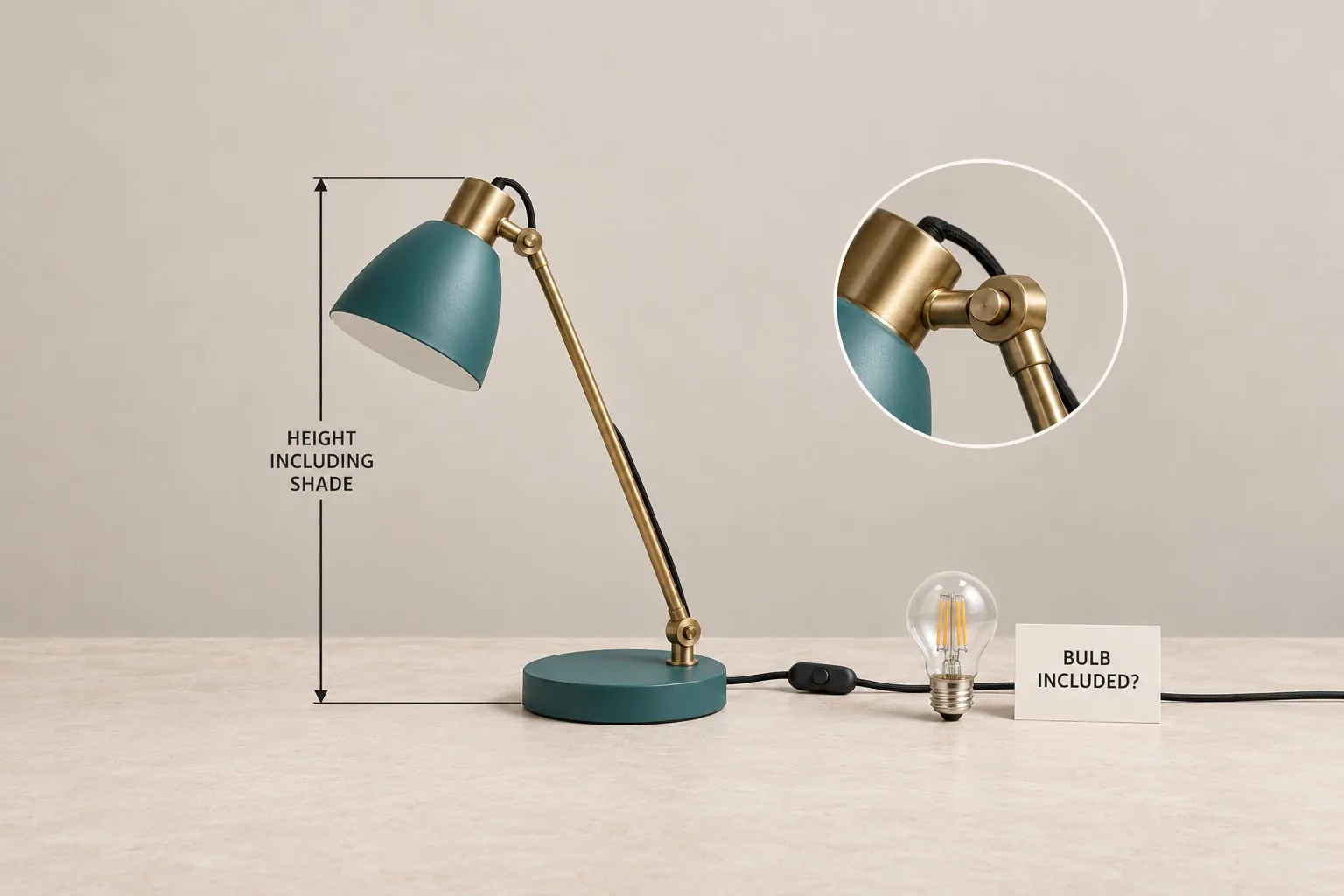
List what the customer receives. Separate included components from optional accessories and items shown for illustration. For a lamp, that might mean clarifying the shade, cable and whether a bulb is supplied. A styled photograph should not be the only evidence of the package contents.
Use the current supplier specification or another authoritative product source, with an owner responsible for verification. Do not fill missing fields with assumptions copied from a similar model. A plausible specification for the wrong version can create an expensive misunderstanding.
Make specifications understandable and comparable
Use clear labels and consistent units across similar products. “Height including shade” is more informative than “size”, and a measurement needs its unit. Explain whether dimensions refer to the product, assembled item or packaging. These distinctions matter when the customer is checking a specific space.
Use scannable specifications with clear terminology and consistent labels across comparable products. Apply these principles to information customers actually need. Expanding a table with irrelevant technical fields can make choosing harder rather than better informed. Our ecommerce product information guide provides the related checks.
Translate specialist terms when they influence the buying decision. Keep the accurate specification and add a short practical explanation. Avoid replacing it with a vague benefit that prevents an experienced customer from checking whether the product meets their requirements.
Test the specification layout on a narrow screen. Ensure that labels remain connected to their values and important details are easy to find. Expandable sections can help organise a long page, but the section names must make their contents predictable.
Use photographs to answer specific questions
Assign a purpose to each image. Show the complete product, important connections, included components and details that affect use. A lifestyle image can show context, while a close-up can explain an adjustment or fastening that a distant photograph leaves unclear.
Show scale responsibly. A reference object can help, but exact dimensions still belong in the text or an accessible diagram. Photography can distort apparent size, particularly when lenses, angles and cropping vary across products. Avoid relying on visual impression alone.
Keep image captions accurate and distinguish variants. If a photograph shows an optional attachment or a different colour, explain that clearly. A customer should be able to tell which pictures represent the selected item and which illustrate other possibilities.
Include useful alternative text where an image communicates information. Describe the relevant feature or view rather than repeating a string of search phrases. Also ensure that essential facts appear in readable page content, so a shopper does not need to interpret a picture to discover them.
Explain ordering and fulfilment before the commitment
State the relevant delivery information in the context of the product and destination. Distinguish dispatch estimates from delivery estimates and clarify any factors that require a separate check. Avoid a prominent promise that the checkout later contradicts.
Explain assembly, installation or setup requirements when they affect the purchase. Say whether the customer needs tools, additional parts or specialist help, based on verified information. A short preparation note can prevent an unsuitable order more effectively than a long promotional paragraph.
Link to clear, current policies for returns, warranties and support where relevant. Summarise carefully without creating a contradictory version of the policy on each product page. Give ownership of these statements to the appropriate business team and review them when the underlying arrangements change.
Check variant selection and availability messages together. Choosing a different size or package should update the information that depends on that choice. Test the actual interface, because accurate copy stored in the catalogue is not enough if the page shows the wrong variant's details.
Write a description that connects facts to use
Lead with the product's practical purpose and its most useful differentiators. Explain how a feature affects everyday use, then provide the underlying fact. For example, a replaceable part can be relevant to maintenance, but the page should identify which part can be replaced and how to obtain it.
Use examples appropriate to the category. A desk lamp description might explain adjustment range and where the switch sits. A storage product might explain which measurements a customer should take. These examples should assist a decision rather than merely make the copy longer.
Keep unsupported superlatives out of the description. “Best”, “perfect for everyone” and “guaranteed to last” rarely help a shopper verify suitability. Precise information and honest boundaries make the page easier to assess and easier for the business to maintain.
Use natural category vocabulary in headings and descriptions. Search relevance follows from explaining the correct product and its use clearly. Repeating every possible keyword variation can make important details harder to scan and does not substitute for missing specifications.
Establish a maintainable product information process
Create required fields for each category and define what a complete entry means. Assign responsibility for specification accuracy, photographs, fulfilment information and editorial review. Mark a field as needing verification when evidence is missing instead of quietly publishing a guess.
Review a small sample of pages with customers or colleagues unfamiliar with the products. Ask them to complete realistic decisions: determine whether an item fits a space, identify what arrives in the box or compare two versions. Observe where they look and which details they cannot resolve.
Monitor the type of pre-sales questions after changes, alongside suitable purchases and return reasons. A reduction in messages is valuable when customers are better informed, rather than when contact has become difficult. Giraffe Digital's website design service connects content, structure and enquiries, helping practical product information become part of a clearer buying journey.
Frequently asked questions
How should we make specifications understandable and comparable?
Use clear labels and consistent units across similar products. "Height including shade" is more informative than "size", and a measurement needs its unit. Explain whether dimensions refer to the product, assembled item or packaging. These distinctions matter when the customer is checking a specific space. Use scannable specifications with clear terminology and consistent labels across comparable products. Apply these principles to information customers actually need. Expanding a table with irrelevant technical fields can make choosing harder rather than better informed. Our ecommerce product information guide provides the related checks. Translate specialist terms when they influence the buying decision. Keep the accurate specification and add a short practical explanation. Avoid replacing it with a vague benefit that prevents an experienced customer from checking whether the product meets their requirements.