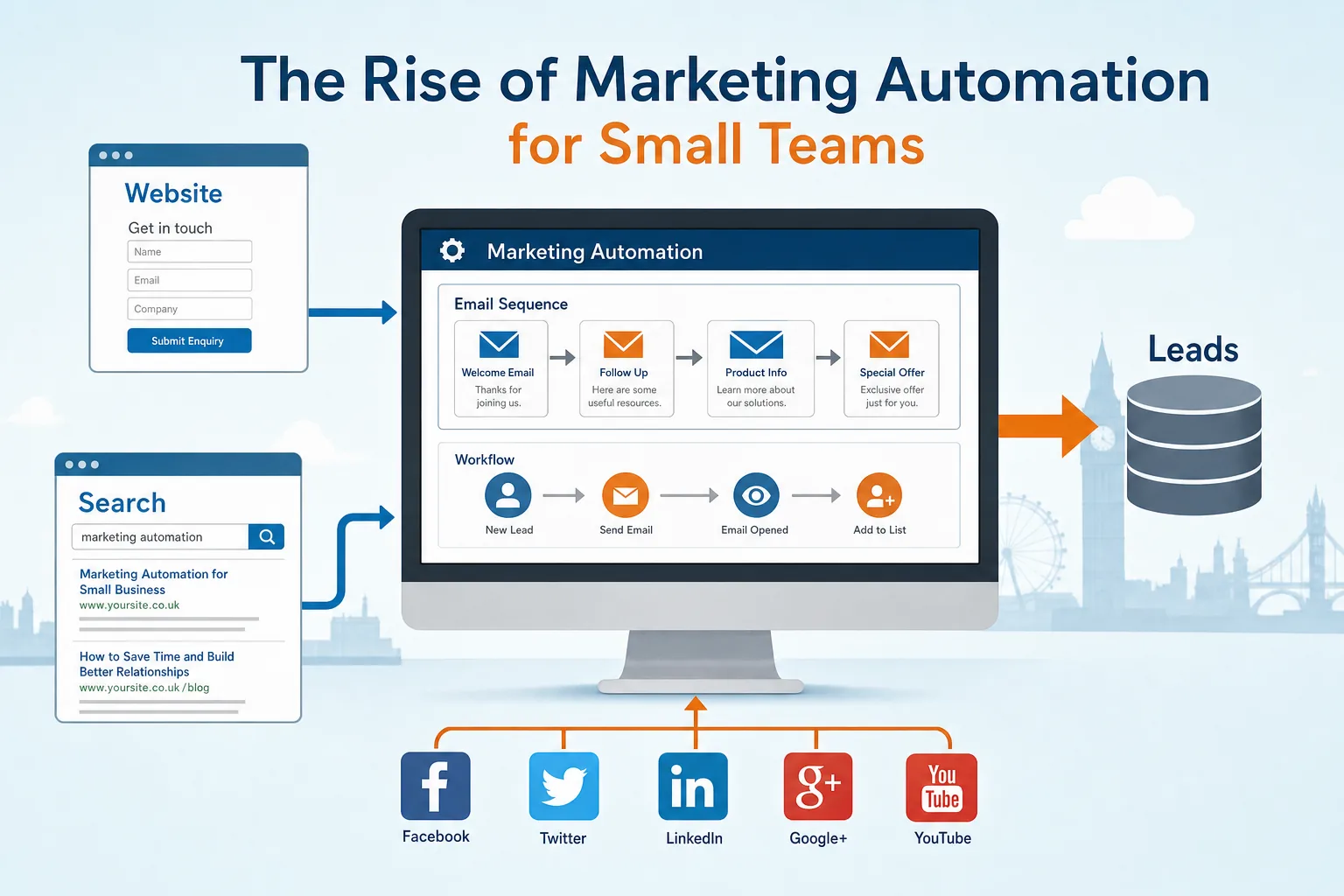
Marketing automation is no longer reserved for large organisations with expansive marketing departments. For many small UK businesses, it is becoming a practical way to make better use of time, follow up with prospects more consistently and turn a website into a more useful part of the sales process. Used sensibly, marketing automation can help a small team send timely emails, manage enquiries, measure campaigns and keep in touch with customers without repeating the same manual tasks every day.
The phrase can sound rather technical, but at its heart marketing automation is about joining together the activities that already matter: your website, enquiry forms, email marketing, customer database, social media, search marketing and reporting. The objective is not to replace good communication. It is to make sure good communication happens at the right moment, with the right people, and with fewer missed opportunities.
What marketing automation means for a small business
For a small business, marketing automation does not need to mean a complex enterprise system. It might begin with a simple sequence of emails sent after someone downloads a guide, books a consultation, requests a brochure or signs up for a newsletter. It might include assigning enquiries to the right person, reminding the team to follow up, or showing which pages a prospect visited before making contact.
A typical small team often has one or two people managing a broad mix of responsibilities: sales enquiries, website updates, social posts, email newsletters, customer service and reporting. When those tasks sit in separate places, it is easy for a good lead to go cold. Marketing automation helps by creating a clearer process. If someone completes a website form, they can receive a helpful acknowledgement straight away. A few days later, they can receive a related article or case study. If they click through and show further interest, the sales team can be prompted to make personal contact.
The most useful automation is usually built around common customer questions. For example, a company offering professional services might create an email series explaining how the initial consultation works, what information a client should prepare, and how to compare suppliers. An online retailer might send product care advice after purchase, followed by a reminder to review the product or explore a related category. A training provider might send joining instructions, pre-course reading and post-course follow-up without having to recreate each message manually.
Why the website is the centre of the system
Your website should sit at the centre of any marketing automation activity. Social media, paid search, email campaigns and printed materials can all drive people towards it, but the website is usually where prospects decide whether to enquire, buy, call, subscribe or leave. If the site is dated, confusing or difficult to use on a mobile device, automation will only send more people into a poor experience.
Good website design for automation begins with clear journeys. Visitors should be able to understand who you help, what you offer and what to do next. Each important service or product page should have a suitable call to action, whether that is requesting a quote, downloading a guide, signing up for updates or contacting the team. These actions then become the trigger points for useful automated follow-up.
Landing pages are particularly valuable. Rather than sending all traffic to the home page, a landing page can focus on one offer, one audience or one campaign. It might be designed for an AdWords advert, an email campaign, a LinkedIn post or a printed leaflet. The page should contain a concise explanation, supporting proof, a clear form and a simple next step. Once the form is submitted, automation can ensure that the visitor receives the promised information promptly and is added to the appropriate follow-up route.
Small teams should also pay close attention to mobile users. More customers are researching suppliers, reading emails and visiting websites from smartphones and tablets. A responsive website that adapts to different screen sizes makes automated campaigns more effective because the user experience remains consistent after the click. If an email is read on a phone but the linked page is hard to use, the campaign is likely to lose momentum.
Practical uses of marketing automation
The best starting point is to identify repeated tasks that are important but often delayed. Automation should remove friction, not create unnecessary complication. The following examples are well suited to small teams.
- Welcome emails: Send a friendly introduction when someone joins your mailing list, including what they can expect and where to find useful resources.
- Lead nurturing: Send a short series of helpful emails to prospects who have requested information but are not yet ready to buy.
- Event follow-up: After a seminar, exhibition or workshop, send notes, slides, related articles and a clear next step.
- Customer onboarding: Help new customers understand how to get started, who to contact and how to make the most of your product or service.
- Re-engagement campaigns: Contact subscribers who have not opened or clicked for a while, offering them a useful reason to stay connected.
- Internal reminders: Alert the right person when a high-value enquiry arrives or when a prospect has interacted with several pieces of content.
These activities work best when the content is genuinely useful. A prospect who is comparing suppliers may appreciate a checklist, buying guide or explanation of the process. A customer who has recently purchased may appreciate instructions, maintenance advice or an invitation to ask questions. Automation should feel like organised service, not a stream of impersonal sales messages.
Email marketing remains the foundation
Email is still the most common and practical starting point for marketing automation. It is direct, measurable and suitable for both business-to-business and consumer audiences. However, it must be used with care. Lists should be built with permission, expectations should be clear, and every campaign should give recipients a straightforward way to unsubscribe.
Segmentation is one of the main advantages of automation. Rather than sending the same newsletter to everyone, a business can divide contacts by interest, location, customer type, purchase history or stage in the buying process. A firm selling to both homeowners and commercial organisations, for example, should avoid sending every contact identical messages. The more relevant the message, the more likely it is to be read and acted upon.
Autoresponders are a simple but powerful feature. They allow a sequence of emails to be sent at set intervals after a person takes an action. A small team might create a three-part series: first, deliver the requested guide; second, share a related article or example; third, invite the reader to speak to the team. This is not a substitute for personal follow-up, but it helps maintain contact until a prospect is ready for a conversation.
Connecting social media with automation
Social media marketing can also benefit from a more organised approach. Many small businesses post when they have a spare moment, which often leads to inconsistent activity. Scheduling tools can help plan updates in advance, but automation should not remove the human element. Social networks are places for conversation, not just broadcast.
In 2014, the most relevant platforms for many UK businesses include Facebook, Twitter, LinkedIn, Google+ and YouTube, depending on the audience. A business-to-business organisation may find LinkedIn useful for professional visibility and relationship building, while a consumer brand may see more response from Facebook and visual content. The key is to choose channels based on where customers actually spend time, rather than trying to maintain every network equally.
Marketing automation can support social media by tracking which updates drive visits, which landing pages convert, and which topics generate enquiries. For example, if a LinkedIn post about a particular service leads to guide downloads, those new contacts can enter a relevant email sequence. If a Twitter campaign drives traffic but few enquiries, the landing page or offer may need improvement. The aim is to connect activity to outcomes rather than simply counting followers.
Search marketing and content that earns attention
Search marketing remains an important part of the picture. A business that invests in automation still needs people to find its website in the first place. Search engine optimisation should focus on useful, well-structured content, clear page titles, descriptive headings, sensible internal links and technically sound pages that can be crawled and understood.
Keyword research is still valuable, but it should not lead to awkward repetition or thin pages created purely for search engines. Search behaviour is becoming more conversational, and businesses should answer real questions that customers ask before they buy. Service pages, advice articles, frequently asked questions and guides can all support both organic search and automated follow-up.
It is also important to monitor the quality of inbound links. Shortcuts such as mass directory submissions, article spinning or irrelevant link exchanges can cause more harm than good. A small business should aim to earn links through useful resources, local relevance, partnerships, industry bodies, press coverage and content that people genuinely want to reference.
Paid search can work well alongside automation. If an AdWords campaign sends visitors to a focused landing page, the business can capture enquiries and continue the conversation by email. This is particularly useful where the initial search is part of a longer buying decision. A visitor may not be ready to call immediately, but they may be willing to download a guide or request more information.
Data, measurement and sensible reporting
One of the strongest business benefits of marketing automation is better measurement. Small teams often struggle to know which activities are producing results. With proper tracking in place, it becomes easier to see where enquiries come from, which emails are opened, which links are clicked and which pages support conversions.
Website analytics should be reviewed regularly, not only when a new site is launched. Useful measures include enquiry form submissions, newsletter sign-ups, downloads, phone call prompts, popular landing pages, traffic sources and visitor behaviour on key pages. These figures help identify what to improve. If many visitors reach a page but few take action, the page may need clearer copy, a stronger offer or a simpler form.
Lead scoring can be useful for some businesses, although it should be kept straightforward. A prospect who visits several service pages, opens multiple emails and downloads a guide may be more engaged than someone who only reads one article. Assigning simple values to these actions can help a small team prioritise follow-up. However, lead scoring should support judgement rather than replace it. A smaller number of well-qualified conversations is often more valuable than a large list of cold contacts.
Technology choices for small teams
The technology market for marketing automation is growing quickly, and it can be tempting to choose a system with more features than the business can realistically use. Before selecting a platform, small teams should clarify their process. What happens when an enquiry arrives? Who responds? What information should be sent automatically? How will contacts be segmented? Which reports matter?
A practical system should integrate with the website, email marketing and customer records as smoothly as possible. It should be easy for the team to update forms, create lists, write emails and review performance. If a tool requires constant external support for everyday changes, it may slow the business down. Equally, if the system is too basic to handle essential segmentation or follow-up, it may limit progress.
It is worth starting with a manageable plan. A business does not need to automate every communication at once. One well-designed enquiry follow-up sequence can prove the value of the approach. From there, the team can add further sequences for different services, customer types or stages of the buying process.
Domain names, branding and trust
A professional digital presence still begins with a suitable domain name. For UK businesses, a clear and memorable domain can support brand recognition, search visibility and customer confidence. The best choice is usually short, easy to spell, easy to say aloud and closely aligned with the organisation’s trading name or main brand.
When choosing a domain, avoid unnecessary hyphens, confusing spellings and names that are too similar to other businesses. Consider securing relevant UK and international variations where appropriate, especially if the brand may grow beyond its current market. Keep renewal details organised and ensure that the domain is registered to the business rather than an individual employee. This can prevent administrative problems later.
Domain choice should also support email credibility. A business using a branded email address generally appears more professional than one relying on a generic free address. Consistent branding across the website, email campaigns and social profiles helps prospects recognise the business when they move between channels.
Keeping automation personal and trustworthy
The greatest risk with marketing automation is overuse. Poorly planned automation can feel cold, repetitive or intrusive. Customers do not want to be treated as entries in a database. They want timely, relevant information and an easy way to speak to a real person when needed.
Every automated message should have a clear purpose. If it does not help the recipient, it should not be sent. The tone should match the brand and the stage of the relationship. A first enquiry may call for helpful guidance and reassurance, while an existing customer may appreciate practical tips, service reminders or invitations to provide feedback.
Marketing automation is most effective when it supports better human communication rather than trying to remove it.
Small businesses have an advantage here. They are often closer to their customers than large organisations and can write in a more natural, approachable voice. Automation should help preserve that personal touch as the business grows.
How to get started
The simplest way to begin is to map one customer journey. Choose a common route, such as a visitor arriving from search, reading a service page, completing an enquiry form and waiting for a response. Identify where delays or missed opportunities occur. Then decide which parts can be improved through clearer website design, better content, email follow-up or internal reminders.
Next, review the content you already have. Useful articles, brochures, frequently asked questions, videos and guides can often be repurposed into automated sequences. If there are gaps, create content that answers the questions prospects usually ask before they buy. This will make your automation more helpful and your website stronger for search.
Finally, test and refine. Check that forms work, emails display correctly, links lead to the right pages and notifications reach the right people. Review performance after a few weeks and adjust subject lines, timing, calls to action and landing pages. Marketing automation is not a one-off project; it is an ongoing way to improve how your business communicates online.
For small teams, the rise of marketing automation is not about adopting technology for its own sake. It is about building a more reliable marketing and sales process. With a well-designed website, useful content, careful email marketing, sensible search activity and clear measurement, automation can help a business make more of every enquiry and every relationship.
Frequently asked questions
What should we know about practical uses of marketing automation?
The best starting point is to identify repeated tasks that are important but often delayed. Automation should remove friction, not create unnecessary complication. The following examples are well suited to small teams. Welcome emails: Send a friendly introduction when someone joins your mailing list, including what they can expect and where to find useful resources; Lead nurturing: Send a short series of helpful emails to prospects who have requested information but are not yet ready to buy; Event follow-up: After a seminar, exhibition or workshop, send notes, slides, related articles and a clear next step; Customer onboarding: Help new customers understand how to get started, who to contact and how to make the most of your product or service; Re-engagement campaigns: Contact subscribers who have not opened or clicked for a while, offering them a useful reason to stay connected; Internal reminders: Alert the right person when a high-value enquiry arrives or when a prospect has interacted with several pieces of content.