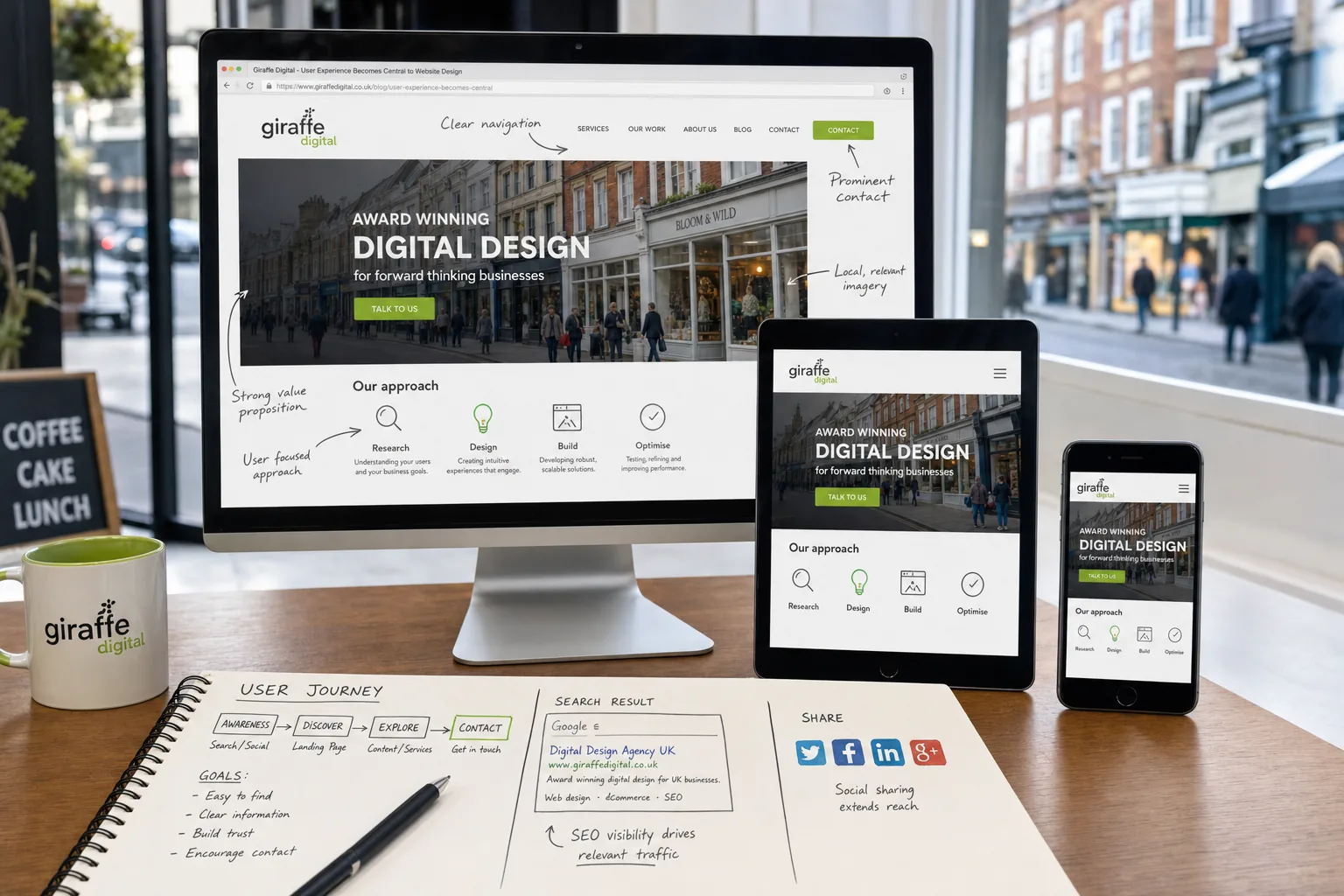
For many UK businesses, a website is no longer simply an online brochure. It is often the first point of contact a potential customer has with an organisation, and the quality of that experience can decide whether they make an enquiry, place an order or leave for a competitor. User experience has therefore become central to website design. A site needs to look professional, but it must also be easy to understand, quick to use and helpful at every stage of the customer journey.
User experience, often shortened to UX, is concerned with how people feel and behave when using a website. Can they find what they need? Is the navigation clear? Does the site work properly on a mobile phone? Are contact details easy to locate? Do pages load quickly enough to keep attention? These questions are not just design details. They affect sales, enquiries, search performance, brand perception and customer loyalty.
Why user experience matters for business websites
A well-designed website should support the goals of the business and the needs of the visitor at the same time. If someone arrives from a search engine, social media post or printed advert, they should quickly understand who you are, what you offer and what they should do next. If the experience is confusing, slow or cluttered, even strong branding and good products may not be enough to keep them engaged.
Good user experience helps reduce friction. A local service company might want more telephone enquiries, a manufacturer may want technical specification downloads, while an online retailer needs a smooth route from product page to checkout. In each case, design should remove unnecessary effort. The fewer obstacles there are, the more likely visitors are to take action.
There is also a trust factor. People make quick judgements online. Outdated layouts, broken links, cramped text, poor imagery and difficult forms can all create doubt. A clear, modern and well-structured site suggests that the business is organised, credible and attentive to detail. This is particularly important for companies whose customers are comparing several suppliers before making contact.
Designing around real user behaviour
Effective website design begins with understanding the people who will use the site. It is tempting to design around internal preferences, but customers do not always think in the same way as a business owner or sales team. They may use different words, ask different questions and look for reassurance before they are ready to speak to anyone.
Before changing a website, it is useful to review the most common reasons people visit. These might include checking opening hours, comparing services, reading case studies, finding a telephone number, requesting a quote or learning whether a company serves their area. Once these tasks are clear, the website can be planned around them.
Navigation should be simple and predictable. Main menu labels such as Services, About, Case Studies, Blog and Contact are often more useful than creative wording that requires interpretation. Important pages should not be hidden several clicks deep. A visitor who is ready to enquire should be able to find a clear contact route from any key page.
Content should also be organised for scanning. Many users do not read every word on a page, particularly when viewing on a smaller screen. Clear headings, short paragraphs, bullet points and well-labelled calls to action help people pick out the information they need. This does not mean content should be thin. It means useful information should be presented in a way that respects the visitor’s time.
Mobile use is changing expectations
Mobile and tablet browsing has become a normal part of how people research businesses. A customer may first see a company on a phone while commuting, then revisit on a desktop computer at work, and later make contact from a tablet at home. A website that only works well on a large monitor is therefore likely to miss opportunities.
Responsive website design is now a practical requirement for many businesses. A responsive site adapts its layout to the screen size being used, making text readable, buttons easier to tap and content more comfortable to browse. This is better than forcing mobile visitors to pinch and zoom their way around a desktop layout.
Mobile user experience is not only about layout. Telephone numbers should be easy to tap, forms should be short and manageable, and key information such as address, opening hours and service areas should be easy to locate. Images need to be optimised so they do not slow the page unnecessarily. Menus should be clear rather than hidden behind confusing interactions.
Search engines are also placing increasing emphasis on mobile-friendly pages. Businesses that rely on search visibility should not treat mobile design as an optional extra. If users have a poor experience after clicking a search result, the website is unlikely to deliver its full commercial value.
Page speed and technical quality influence user experience
A visually impressive site can still perform poorly if it takes too long to load or behaves unpredictably. Visitors are impatient, especially on mobile connections. Large uncompressed images, unnecessary scripts, poor hosting arrangements and overly complex page layouts can all slow a site down.
Technical quality supports user experience in several ways. Pages should load promptly, links should work, forms should submit correctly and error messages should be clear. A content management system should be kept up to date, both for security and stability. If a website uses additional plug-ins or extensions, they should be chosen carefully and maintained properly.
Browser compatibility remains important. A site should be tested across common desktop and mobile browsers so that layouts, forms and navigation behave consistently. Small technical problems can create a large amount of frustration for users, particularly if they occur at the point of enquiry or checkout.
Businesses should also consider the quality of their hosting and domain set-up. A memorable domain name is easier to share, remember and print on marketing materials. For UK-focused businesses, a relevant UK domain can support customer confidence, while a .com may still be useful for broader or international ambitions. Domain names should be simple, easy to spell and aligned with the brand wherever possible. Avoid unnecessary hyphens, confusing abbreviations and names that are too close to competitors. It is also sensible to keep registration details organised, renew domains in good time and ensure that email and website records are managed reliably.
Content is part of the experience
User experience is not limited to design and technology. The words on the page play a major role in helping visitors make decisions. Strong content answers questions, explains value and reduces uncertainty. Weak content leaves visitors guessing.
For a service business, each key service page should explain what the service includes, who it is suitable for, what problems it solves and how to take the next step. For a retailer, product pages should include clear descriptions, good imagery, delivery information and returns guidance where relevant. For a professional firm, staff profiles, credentials and useful articles can help build confidence.
Calls to action should be specific and appropriate to the page. A visitor reading an introductory guide may not be ready to buy immediately, but they might download a brochure, sign up for updates or read a related article. A visitor on a service page may be ready to request a quote or book a consultation. Matching the call to action to the user’s stage in the decision process makes the experience feel more helpful and less pushy.
Blog content can also support user experience and search marketing. Useful articles can answer common questions, demonstrate expertise and attract visitors who are researching a topic. However, publishing for the sake of it rarely helps. A business blog should be planned around real customer questions, seasonal opportunities, product knowledge and industry insight.
User experience and search marketing work together
Search engine optimisation is sometimes treated as a separate discipline from design, but the two are closely connected. A page that is easy for users to understand is often easier for search engines to interpret as well. Clear headings, descriptive page titles, logical internal links and focused content all help both audiences.
Keyword research remains useful, but it should be applied naturally. The phrase user experience, for example, should appear where it genuinely fits, not be repeated awkwardly. Search engines have become better at understanding context, and visitors will quickly notice content written only to satisfy an algorithm.
Local search is particularly important for many UK businesses. Consistent business names, addresses and telephone numbers across the website and reputable online listings help customers and search engines connect a business with its location. Location pages can be valuable when they contain genuinely useful local information rather than duplicated text with only the place name changed.
Analytics should be used to understand how visitors interact with the site. Useful measures include bounce rate, time on page, completed enquiry forms, telephone clicks where tracked and the pages that commonly lead to conversions. This information can highlight where the user experience is working and where improvements may be needed.
Social media must lead to a good website experience
Social media marketing can bring attention to a business, but the website often needs to complete the journey. A post on Facebook, Twitter, LinkedIn, Instagram or Pinterest may generate interest, yet a poor landing page can waste that opportunity. The message in the social post and the content on the landing page should feel connected.
If a business promotes a seasonal offer, event, new service or helpful guide, the link should take users directly to the relevant page rather than the homepage. The page should repeat the key message, provide clear details and make the next step obvious. This creates continuity and avoids making visitors search for what was promised.
Social sharing buttons can be useful, but they should not clutter the page or slow it down. It is better to place them where they make sense, such as on blog articles, guides and news posts. Businesses should also ensure that shared pages display properly, with suitable titles, descriptions and images, so links look professional when they appear in social feeds.
The tone of social media and website content should be consistent. If a brand is helpful and approachable on social channels, the website should not feel cold or overly complicated. A joined-up experience strengthens recognition and helps customers feel they are dealing with the same organisation at every touchpoint.
Practical steps to improve website user experience
Improving user experience does not always require starting again from scratch. Many useful changes can be made by reviewing the site from the visitor’s point of view and prioritising the areas that affect enquiries or sales most directly.
- Review the homepage. Make sure it explains what the business does, who it serves and what visitors should do next.
- Simplify the navigation. Use clear labels and avoid overwhelming visitors with too many menu options.
- Improve key service pages. Add helpful explanations, benefits, common questions and clear calls to action.
- Test forms. Check that enquiry forms are short enough, work correctly and provide a clear confirmation message.
- Optimise for mobile. Review text size, button spacing, image scaling and the ease of making contact from a phone.
- Speed up important pages. Compress large images, remove unnecessary elements and review hosting performance.
- Use analytics. Identify pages with high exits, low engagement or strong conversion potential.
- Check trust signals. Include testimonials where appropriate, accreditations, case studies, clear contact information and privacy information.
It can also be valuable to ask people outside the business to complete simple tasks on the website. For example, ask someone to find a specific service, locate the contact form or identify whether the business serves their area. Watching where they hesitate can reveal issues that internal teams no longer notice.
Planning future website projects around the customer
When commissioning a new website or redesign, user experience should be discussed from the outset. It should influence the structure, design, content, technology and marketing plan. A project that begins only with visual preferences may look attractive but fail to support the way customers actually behave.
A useful planning process should include business goals, audience needs, competitor review, content requirements, search considerations and technical expectations. Wireframes or prototype layouts can help test page structure before detailed design begins. This makes it easier to agree where key messages, navigation and calls to action should sit.
Businesses should also plan for ongoing improvement. A website is not finished the day it goes live. Search trends change, customer questions develop, products and services evolve, and analytics data reveals new opportunities. Regular reviews help keep the experience relevant and commercially effective.
A successful website is not simply the one that looks the most impressive. It is the one that helps the right people find the right information and take the right action with confidence.
Putting user experience at the centre
User experience has become central to website design because it connects design decisions with real business outcomes. It affects how visitors judge a brand, how easily they move through a site, how likely they are to enquire and how well marketing activity performs. For UK business owners investing in web design, SEO, branding or digital strategy, UX should be treated as a core consideration rather than a finishing touch.
The most effective websites are built around people. They are clear, fast, mobile-friendly, trustworthy and useful. They support search marketing, work well with social media activity and make it easy for customers to take the next step. By focusing on user experience, businesses can create websites that do more than look good: they can create websites that work harder.
Frequently asked questions
What should we know about practical steps to improve website user experience?
Improving user experience does not always require starting again from scratch. Many useful changes can be made by reviewing the site from the visitor’s point of view and prioritising the areas that affect enquiries or sales most directly. Review the homepage. Make sure it explains what the business does, who it serves and what visitors should do next; Simplify the navigation. Use clear labels and avoid overwhelming visitors with too many menu options; Improve key service pages. Add helpful explanations, benefits, common questions and clear calls to action; Test forms. Check that enquiry forms are short enough, work correctly and provide a clear confirmation message; Optimise for mobile. Review text size, button spacing, image scaling and the ease of making contact from a phone; Speed up important pages.