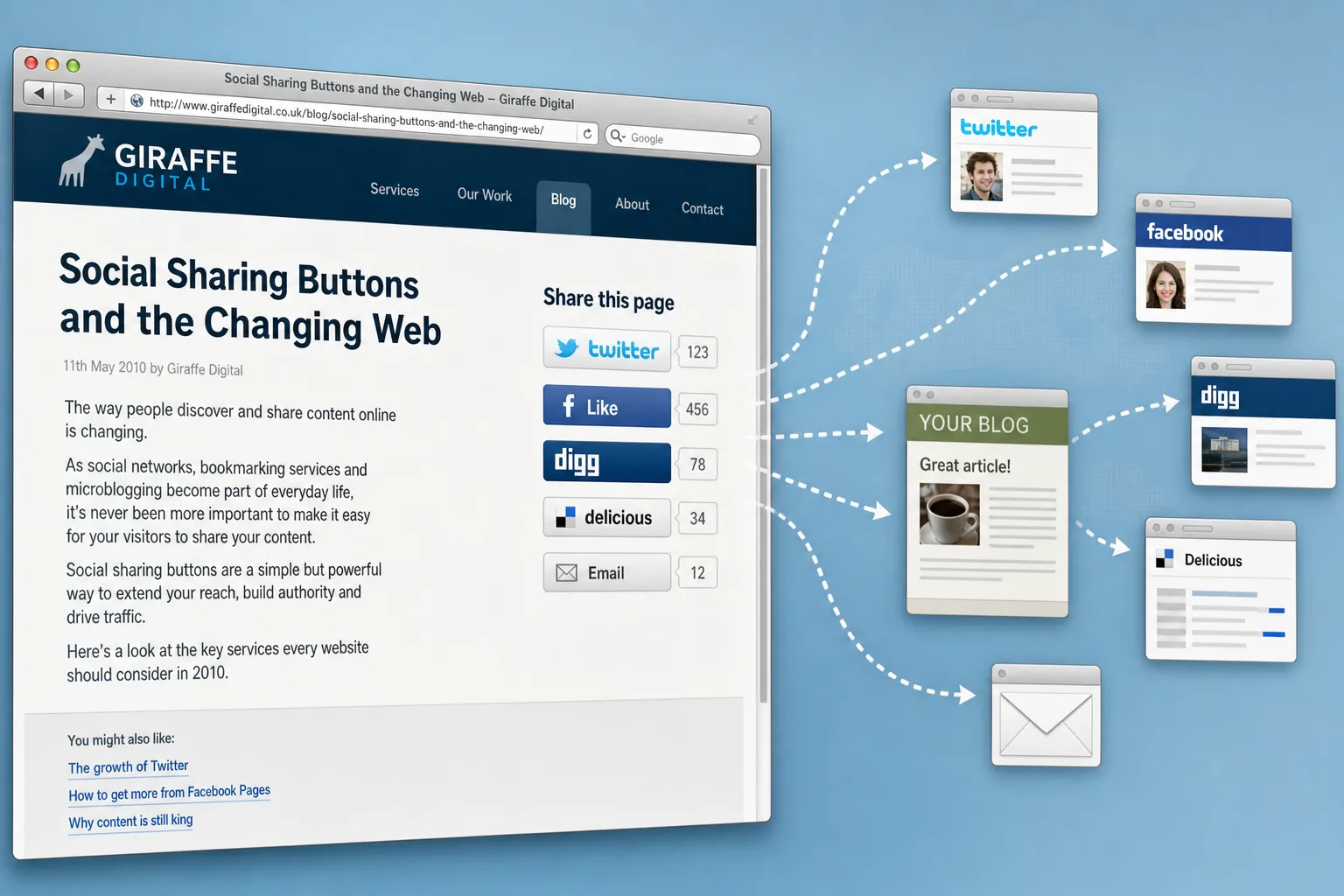
Social sharing has quickly become a familiar part of website design. While visitors once copied a link into an email or bookmarked a page for later, many now expect to share an article, product, offer, or useful resource with a single click. For UK businesses, this is more than a fashionable add-on. Used carefully, sharing buttons can help good content travel further, bring new visitors to your site and support wider search and social media marketing activity.
The important word is carefully. A row of icons will not make an unhelpful page popular, and adding every possible button can make a website look cluttered or dated very quickly. The best approach is to think about who your customers are, which networks they use, what sort of content they are likely to pass on and how social sharing fits into your wider digital strategy.
Why social sharing matters for business websites
The web is becoming more connected around people, recommendations and real-time conversations. Search engines remain essential, but many visitors now discover businesses through a mixture of search results, email recommendations, blogs, forums, Twitter updates, Facebook posts and shared links. A recommendation from a customer, colleague or friend can carry a level of trust that advertising alone struggles to achieve.
For a business website, social sharing buttons reduce friction. If somebody reads a helpful buying guide, sees an interesting case study, finds a useful local service page or spots a seasonal offer, a clear share button can turn that moment of interest into a referral. That referral may only produce a few visits at first, but those visitors can be highly relevant because they arrive through a personal recommendation.
Social sharing is particularly useful for businesses that regularly publish content. Blog posts, guides, checklists, videos, event announcements, competitions, and opinion pieces all have a stronger reason to be shared than a standard company profile page does. This is one reason why a website should not be treated as a static brochure. Regular, useful updates give existing customers something to pass on and give new visitors a reason to return.
There is also a branding benefit. When a page is shared, the business name, headline, and description may appear to people who have not searched for the company directly. If the message is clear and the content is useful, each share can reinforce theorganisation'ss expertise. For small and medium-sized businesses, this can be a cost-effective way to build familiarity in a crowded market.
Choosing the right social sharing buttons
In October 2010, the most common sharing choices include Twitter, Facebook, Digg, Delicious, StumbleUpon, Reddit and email forwarding. Google Buzz is also being used by some audiences, particularly those already active with Google accounts. The recent arrival of the Facebook Like button and Twitter's official Tweet button has made it easier for website owners to present simple, recognisable actions to visitors.
The right mix depends on your audience. A technology blog may benefit from Digg, Reddit and Twitter. A local retailer or leisure business may find Facebook and email more useful. A professional services firm may see stronger results from Twitter, carefully written blog content and industry-specific communities. It is better to show five relevant options than fifteen icons that distract visitors and slow the page.
Before adding buttons, ask a few practical questions. Where are your customers already active? Which networks are sending traffic in your website analytics? Are your competitors receiving comments, links or mentions from particular communities? Do your staff have the time to support activity on the networks you are encouraging? A share button should be part of a living marketing process, not a decoration.
Third-party services can provide a compact set of sharing options and simplify implementation. They are convenient, especially for smaller sites, but they should still be tested. Check how the buttons look in common browsers, whether they affect page loading speed and whether they produce sensible titles and links when clicked. If a visitor tries to share a page and the message is poorly formatted, the opportunity may be lost.
Where to place sharing buttons on a page
Placement has a large effect on whether social sharing feels useful or intrusive. On articles and blog posts, buttons often work well near the top of the content, where they are visible, and again at the end, where the reader has had time to judge the page's value. On product pages, sharing links may sit near product information or reviews, but they should not compete with the main enquiry or purchase action.
For service pages, the decision is more subtle. A visitor reading about accountancy, design, consultancy or building services may be less likely to share the page publicly than someone reading a helpful guide. In that case, a simple email option or a small set of social links may be enough. If the page is intended to generate enquiries, do not let sharing buttons distract from the telephone number, contact form or quotation request.
Visual design matters. Buttons should be clear, consistent and aligned with the rest of the website. A badly placed cluster of colourful icons can weaken an otherwise professional design. They should not cover important text, push content too far down the page or make the page appear less trustworthy. Good website design balances visibility with restraint.
It is also worth considering whether to show share counts. A high count can provide social proof, suggesting that a page is popular and worth reading. A very low count can have the opposite effect, particularly on a new website. If your site is still building an audience, simple buttons without counters may look cleaner and avoid drawing attention to early figures.
Creating content people actually want to share
Social sharing starts with the page itself. Visitors are unlikely to share thin, sales-heavy or confusing content. They are more likely to pass along something that helps them solve a problem, save time, make a decision, or appear informed in front of their own contacts.
For UK businesses, useful shareable content might include a checklist for choosing a supplier, a plain-English guide to a common industry issue, photographs from a community event, a seasonal maintenance reminder, a comparison of service options, an explanation of new regulations, or an answer to a frequently asked customer question. The aim is not to give everything away, but to demonstrate knowledge and build trust.
Headlines are important because they often become the default text in a shared post. A vague headline such as "Our Latest News" gives people little reason to click. A specific headline such as "Five questions to ask before redesigning your company website" is much stronger. The same applies to page descriptions. Make sure each important page has a clear title and description so that shared links make sense when the page appears elsewhere.
Images can also influence sharing. A relevant photograph, diagram or illustration can make a link more appealing, particularly on networks where previews are displayed. Images should be properly sized, professional, and connected to the page's subject. Avoid using generic pictures to fill space; they rarely add value and can weaken the credibility of the content.
Social sharing and search marketing
Social sharing should support search engine optimisation, not replace it. Search engines still rely heavily on crawlable pages, clear site structure, relevant copy, page titles, inbound links and technical accessibility. A website with poor content, duplicate pages or confusing navigation will not be fixed by adding social buttons.
However, sharing can help content get discovered. When a useful article is shared on Twitter, Facebook or a blog, more people may see it. Some of those people may link to it from their own websites, discuss it in forums or bookmark it. These secondary effects can support search visibility over time, especially when the content deserves attention.
Search engines are also paying closer attention to fresh content and real-time information. Public updates and shared links can bring pages to attention more quickly than waiting for visitors to find them by chance. This does not mean every shared link will improve rankings, and businesses should be wary of anyone promising guaranteed search results from social buttons alone. The sensible view is that social sharing helps distribution, while good SEO ensures the website can be understood, indexed and ranked appropriately.
Tracking is essential. Website analytics can show which networks are sending visitors, which pages are being shared and whether those visitors make enquiries, download information or sign up for updates. Without measurement, it is easy to mistake activity for progress. A page may receive many shares but few enquiries; another may receive fewer shares but attract more qualified visitors. Business value matters more than raw numbers.
Technical and design considerations
Adding social sharing buttons should not degrade a website's performance or usability. Every external script, image or widget has the potential to add loading time. This is particularly important for visitors on slower connections or older office computers. If a page feels sluggish, some visitors will leave before they read the content, let alone share it.
Test the website in the browsers your audience is likely to use, including current versions of Internet Explorer, Firefox, Safari and Chrome. Buttons should display properly, links should open correctly, and the page should remain usable if a third-party service is temporarily unavailable. A robust website should not depend entirely on external widgets to function.
Accessibility should also be considered. Links need to be understandable, not just decorative icons. Visitors using assistive technology, or those browsing with images disabled, should still be able to tell what each option does. Clear labels such as"Share on Twitter" or "Email this page" are more helpful than unexplained icons alone.
For content management systems, sharing buttons can often be added via templates or modules to ensure they appear consistently on blog posts or news items. This is usually preferable to manually pasting code into each page. A template-based approach is easier to manage, easier to update and less likely to produce inconsistent formatting across the site.
Branding, domain names and trust
Social sharing sends people away from your website into other spaces, but the destination still needs to feel trustworthy when they arrive. A professional domain name, clear branding and a consistent tone all help visitors understand who you are and why the page is worth their time.
When choosing or reviewing a domain name, keep it simple, memorable and easy to spell. For many UK businesses, a .co.uk address remains a strong choice, while securing the equivalent .com can help protect the brand where appropriate. Avoid hyphens where possible, think carefully before using abbreviations and make sure the domain can be spoken clearly over the telephone. If your business name is frequently misspelt, consider registering sensible variations and directing them to the main website.
It is also wise to keep domain registration details organised. Use a reliable administrative contact, record renewal dates and make sure the domain is registered in the correct business name. Losing control of a domain can cause significant disruption to email, search visibility and customer confidence. This is a basic digital housekeeping task, but it is one that many businesses overlook until there is a problem.
Brand consistency matters when pages are shared. If your Twitter profile, Facebook page, email newsletter and website all use different descriptions, logos or messages, potential customers may feel uncertain. Social sharing works best when every touchpoint reinforces the same identity and makes the next step clear.
How to make social sharing part of a wider strategy
A good social sharing plan starts with objectives. Do you want more enquiries, more newsletter subscribers, greater awareness of a new service, stronger event attendance or better distribution of your advice content? Each objective may require different pages, different calls to action and different ways of measuring success.
It is also useful to decide who will manage the response. If a blog post is shared and people ask questions on Twitter or Facebook, somebody should be ready to reply helpfully and professionally. Social sharing can open the door to conversation, but unanswered questions can make a business appear inattentive.
Editorial planning helps. Rather than publishing occasional updates with no clear purpose, create a simple content programme focused on customer questions, seasonal themes, industry developments, and business news. Each piece of content should have a clear audience and a clear next step. For example, a website design company might publish a guide to planning a new site, then invite readers to request a consultation. A local retailer might share gift ideas, then direct readers to a product category or in-store event.
Finally, review and refine. If Twitter brings relevant traffic, give it proper attention. If a particular button is never used, remove it. If long guides are shared more often than short announcements, invest in better guides. Social media marketing rewards steady improvement rather than one-off enthusiasm.
A practical addition, not a magic solution
Social sharing buttons are a useful part of the evolving web, but they work best when supported by strong content, sound website design, sensible SEO, and consistent branding. They make it easier for visitors to recommend your pages, but they do not create interest on their own.
For business owners planning a new website or improving an existing one, the best approach is to build sharing into the site thoughtfully from the start. Choose the networks your audience uses, keep the design clean, make the content genuinely useful and measure the results. When done well, social sharing can extend your website's reach and turn satisfied readers into valuable advocates.
Frequently asked questions
What should we know about social sharing and search marketing?
Social sharing should support search engine optimisation, not replace it. Search engines still rely heavily on crawlable pages, clear site structure, relevant copy, page titles, inbound links and technical accessibility. A website with poor content, duplicate pages or confusing navigation will not be fixed by adding social buttons. However, sharing can help content get discovered. When a useful article is shared on Twitter, Facebook or a blog, more people may see it. Some of those people may link to it from their own websites, discuss it in forums or bookmark it. These secondary effects can support search visibility over time, especially when the content deserves attention. Search engines are also paying closer attention to fresh content and real-time information.