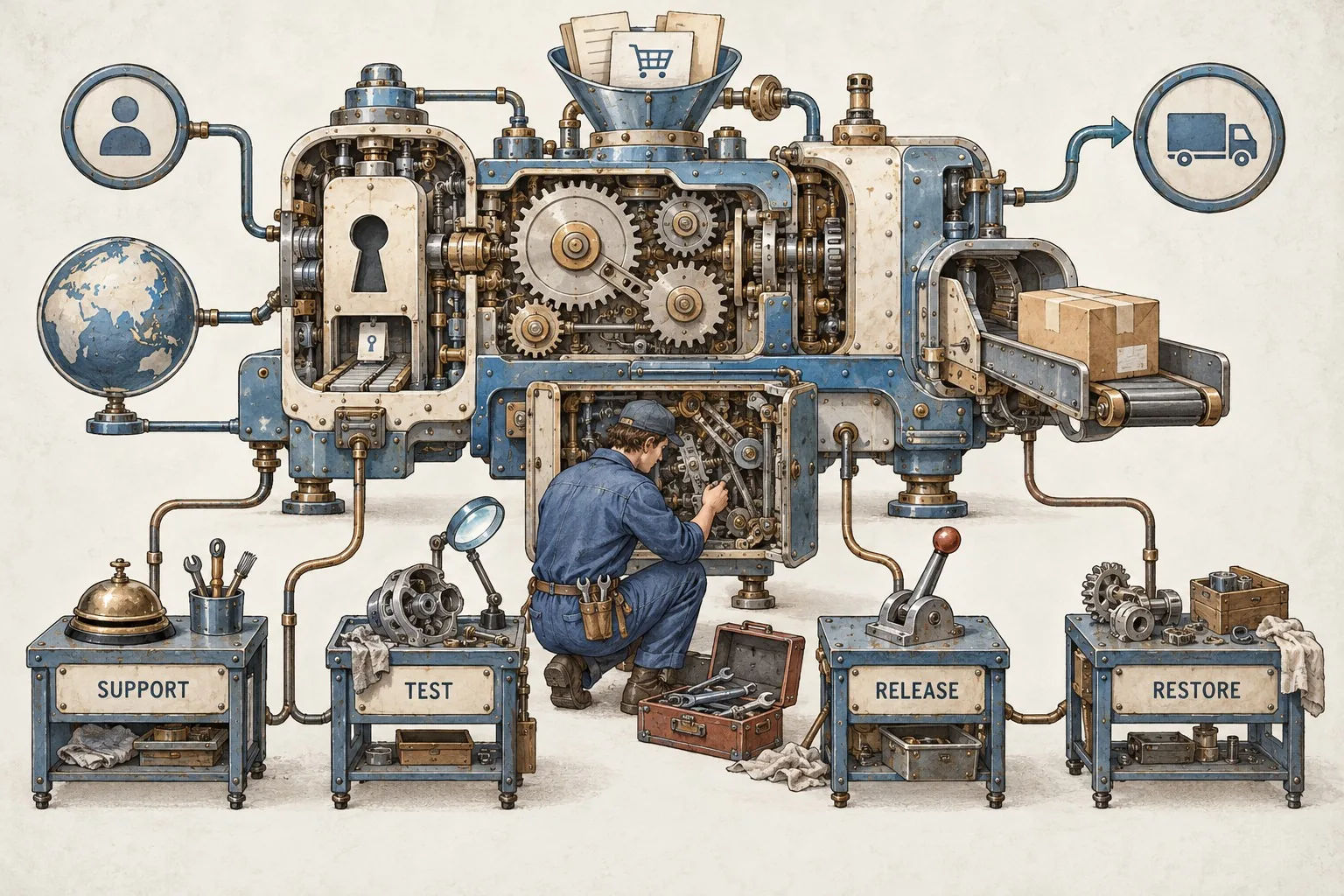
Bespoke software can become central to a business surprisingly quickly. A tool that began as a convenient way to prepare orders or organise bookings may become the place where staff manage essential work. Once that happens, maintenance needs to cover more than fixing visible faults. The business needs to know who monitors the service, how changes are tested and what happens if an important journey stops working.
A software maintenance plan should describe an operating arrangement that people can use. It connects the application, its dependencies, the people supporting it and the business outcomes it must continue to deliver. Writing that arrangement down makes it easier to prioritise work, manage supplier conversations and retain knowledge when staff change.
Define what the maintenance arrangement covers
List the application components and the work included. The scope may cover hosting configuration, application code, background jobs, integrations and the tools used to build and release changes. Identify anything managed elsewhere, such as a payment platform or a separate accounting system, and explain how incidents involving those services will be handled.
Distinguish incidents, defects and enhancements in practical terms. An incident interrupts an operating service. A defect produces behaviour that does not meet the agreed requirements. An enhancement introduces or changes a requirement. These categories can overlap, so give examples from your own application rather than expecting labels to resolve every disagreement.
For an order management tool, a failed login may be an incident, an incorrect total a defect and a new approval stage an enhancement. Record who assesses the request and how urgent business impact affects prioritisation. The aim is a shared decision process rather than a debate about terminology each time someone asks for help.
Keep a usable inventory of dependencies
Ask the developer to maintain a concise inventory of the frameworks, libraries, runtimes and external services that the application relies on. Include relevant versions, responsible accounts and where updates are announced. A list copied from a package file is a starting point, but it should be connected to the running service.
Identify which dependencies require active review and what happens when support arrangements change. Ask the supplier how they assess an update's relevance and test compatibility. Avoid assuming that every new release must be installed immediately or that an old version can remain indefinitely because it still appears to work.
Include integrations that staff may consider separate from the software. An email delivery service, document processor or identity provider can interrupt the customer journey without a change to your application code. The maintenance plan should make those dependencies visible and assign someone to investigate their failures.
Monitor the business journey as well as the server
A server responding does not establish that users can complete their work. Define the important journeys: signing in, submitting a booking, generating a document or passing an approved order to another system. Decide which checks can run automatically and which need periodic human review.
Plan monitoring around user outcomes, technical operation and security, with clear responses to alerts. Adapt the coverage and urgency to the commercial service's scale and consequences. Assign an owner and an actionable response. Our application monitoring and alert guide provides the related checks.
For each alert, record what it indicates, who receives it and what action they should take. A notification that nobody owns is merely a message. A flood of low-value alerts can also hide important failures. Review monitoring against real incidents and adjust it when you discover a failure that the existing checks did not detect.
Describe how incidents are assessed and handled
Define severity through business impact. Consider who is affected, whether there is a workaround, which records may be involved and how long the interruption can reasonably continue. An unavailable administrative report may matter less than an unavailable booking form during a busy period, even if both failures produce the same technical error.
Record the support route, hours of availability and escalation contacts as agreed with the people providing support. Distinguish acknowledging a report from investigating it, restoring the service and resolving the underlying fault. Vague promises of a quick response can hide different expectations about those stages.
Explain who communicates with staff and customers while a problem is being investigated. Give that person access to accurate status information. The developer should not have to answer every individual enquiry while attempting to restore the service, and staff should not need to invent an explanation.
Make testing part of ordinary maintenance
Keep a set of checks that reflects the application's actual use. Include common journeys, permissions, validation and important exceptions. A change to one calculation may affect several screens or exports, so the developer needs to understand the wider relationships before deciding what to test.
Include regular testing in development and maintenance. Define named checks and review responsibilities for changed journeys. Automated checks are useful, but people still need to assess whether the service remains suitable for its users. Our software release and testing checklist provides the related checks.
Use a suitable test environment and carefully chosen test records. Clarify how test integrations differ from live ones, especially for messages, payments and document delivery. A successful test in an environment that omits an important dependency may leave the live risk unresolved.
Control releases and prepare a recovery route
Describe how a proposed change moves from development to the live application. Record who reviews it, who approves the business behaviour and who performs the release. Keep a brief record of what changed so that staff and support teams can relate a new problem to a recent update.
Plan the recovery route before applying significant changes. Rolling back code may be possible, but changes to stored data can make reversal more complicated. Ask the developer to explain the relevant conditions and what recovery would require. A generic statement that every release can be reversed is not enough.
Choose release timing with the operating team. Consider busy periods, the availability of reviewers and the time needed to observe important journeys afterwards. A small change still deserves appropriate checks if it touches a critical calculation or permission.
Verify backups through restoration
Specify what is backed up and how it relates to a working service. Application files, database records, uploaded documents and configuration may sit in different places. Someone should be able to explain how they would be brought together if recovery became necessary.
Arrange restoration checks appropriate to the business. Record the date, the material restored, whether the application worked and any missing dependencies. The presence of a backup file does not prove that the team can recreate a usable system within an acceptable time.
Discuss the practical effect of losing recent changes. Staff may need to reconcile orders or documents created after the restored point. Include that operating work in the recovery plan, with a named owner and a way to identify affected records.
Make handover information easy to use
A maintenance operating manual should help an authorised person locate the service, understand its dependencies and follow the support process. Include the account inventory, deployment process, monitoring, known limitations and contact routes. Keep access instructions separate from secret values, with sensitive information managed through your agreed secure arrangements.
Test the documentation with someone who did not write it. Ask them to follow a harmless task, such as identifying the current application version or locating an incident record. Missing assumptions often become obvious when another person tries to use the instructions.
Review ownership and access when people or suppliers change. Confirm which accounts the business controls, who can administer them and how departing access will be removed. Discuss code and documentation arrangements with the supplier in clear operational terms before you depend on a single person.
Prioritise improvement work with evidence
Maintain a backlog that separates urgent reliability work from longer-term improvement. Describe technical debt through its business consequences: slow releases, repeated manual fixes, difficult testing or an unsupported dependency. That makes maintenance priorities easier to understand than an unexplained list of technical preferences.
Giraffe Digital's digital strategy service can help connect a business's tools and processes to its customer journey. A useful maintenance plan gives the people operating bespoke software a clear way to keep it reliable, evaluate changes and respond when circumstances change.
Frequently asked questions
How should we define what the maintenance arrangement covers?
List the application components and the work included. The scope may cover hosting configuration, application code, background jobs, integrations and the tools used to build and release changes. Identify anything managed elsewhere, such as a payment platform or a separate accounting system, and explain how incidents involving those services will be handled. Distinguish incidents, defects and enhancements in practical terms. An incident interrupts an operating service. A defect produces behaviour that does not meet the agreed requirements. An enhancement introduces or changes a requirement. These categories can overlap, so give examples from your own application rather than expecting labels to resolve every disagreement. For an order management tool, a failed login may be an incident, an incorrect total a defect and a new approval stage an enhancement.
How should we monitor the business journey as well as the server?
A server responding does not establish that users can complete their work. Define the important journeys: signing in, submitting a booking, generating a document or passing an approved order to another system. Decide which checks can run automatically and which need periodic human review. Plan monitoring around user outcomes, technical operation and security, with clear responses to alerts. Adapt the coverage and urgency to the commercial service's scale and consequences. Assign an owner and an actionable response. Our application monitoring and alert guide provides the related checks. For each alert, record what it indicates, who receives it and what action they should take. A notification that nobody owns is merely a message. A flood of low-value alerts can also hide important failures.
How should we make testing part of ordinary maintenance?
Keep a set of checks that reflects the application's actual use. Include common journeys, permissions, validation and important exceptions. A change to one calculation may affect several screens or exports, so the developer needs to understand the wider relationships before deciding what to test. Include regular testing in development and maintenance. Define named checks and review responsibilities for changed journeys. Automated checks are useful, but people still need to assess whether the service remains suitable for its users. Our software release and testing checklist provides the related checks. Use a suitable test environment and carefully chosen test records. Clarify how test integrations differ from live ones, especially for messages, payments and document delivery. A successful test in an environment that omits an important dependency may leave the live risk unresolved.
How should we verify backups through restoration?
Specify what is backed up and how it relates to a working service. Application files, database records, uploaded documents and configuration may sit in different places. Someone should be able to explain how they would be brought together if recovery became necessary. Arrange restoration checks appropriate to the business. Record the date, the material restored, whether the application worked and any missing dependencies. The presence of a backup file does not prove that the team can recreate a usable system within an acceptable time. Discuss the practical effect of losing recent changes. Staff may need to reconcile orders or documents created after the restored point. Include that operating work in the recovery plan, with a named owner and a way to identify affected records.
How should we prioritise improvement work with evidence?
Maintain a backlog that separates urgent reliability work from longer-term improvement. Describe technical debt through its business consequences: slow releases, repeated manual fixes, difficult testing or an unsupported dependency. That makes maintenance priorities easier to understand than an unexplained list of technical preferences. Giraffe Digital's digital strategy service can help connect a business's tools and processes to its customer journey. A useful maintenance plan gives the people operating bespoke software a clear way to keep it reliable, evaluate changes and respond when circumstances change.